


Quick & secure with your Intuit account

Intuit App Partner
Silver Certified
Approved & authorized by QuickBooks
Late Payment Calculator
At Risk
$25,000
Delayed
$5,000
Recovered
$2,500
50% recovery
50% recovery based on independent research: businesses with payment links get paid in 9.6 days vs 29-day average — 3x faster (BigTime, 600K+ invoices). On-time rates improve from 61% to 87% (Intuit/BigTime).

🏆 THE GOLD RUSH IS LIVE
First 50 ProAdvisors get cash rewards.
Position 1 gets $500. Declining by $10 per signup.
Plus 20% revenue share for everyone. Forever.
CLAIM YOUR SPOTWatch how QuickBooks businesses get paid faster with payment links on their statements
Quick & secure with your Intuit account
No credit card · No monthly fees · 2 min setup
Trusted Integrations







Intuit QuickBooks® is a registered trademark of Intuit Inc.
Enterprise-Grade Security
PCI-DSS Level 1
256-bit SSL Encryption
SOC 2 Compliant
Bank-Level ACH Security
By the Numbers
13,292+
QuickBooks Users Requested This
28,000+
Feature Votes on Intuit Community
$0
Monthly Subscription Fees
2 min
Average Setup Time
The #1 requested QuickBooks feature - add one-click payment links directly on customer statements
Accept ACH at 1% ($20 cap) and credit cards at 3% + $0.30 - all on one platform
Generate beautiful statements with clickable invoice links and aging summaries
Seamless two-way sync with QuickBooks Online - customers, invoices, and payments
Zero monthly subscription fees for life - Limited offer! Just pay per transaction: ACH 1% ($20 cap), Credit Cards 3% + $0.30
Everything you need to get paid faster, integrated seamlessly with QuickBooks Online
Link your QuickBooks account in seconds. We automatically sync your customers and invoices.
Generate professional statements with embedded payment links. Customers pay with one click.
Accept payments at industry-leading rates. Everything reconciles automatically in QuickBooks.
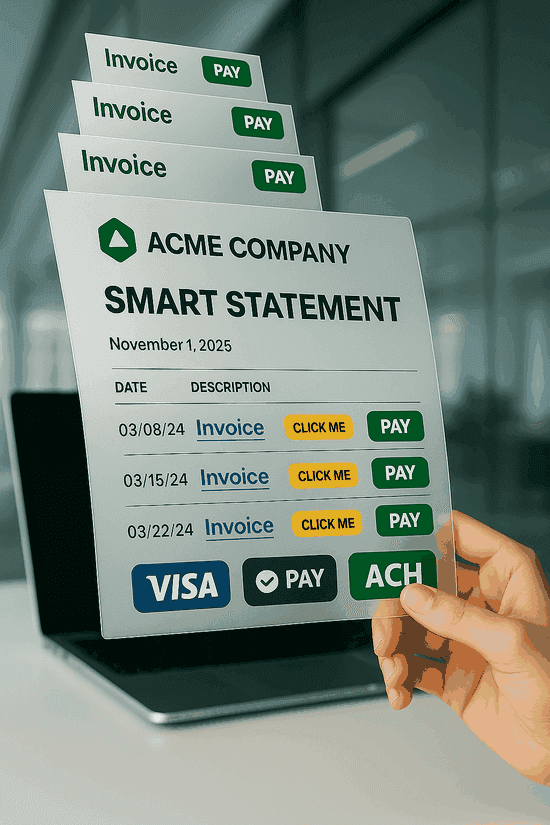
Everything QuickBooks statements should have — but don't.
QuickBooks has 0 of these features on their statements. We have all 5.
Quick & secure with your Intuit account
See how QLink-Pay compares to other payment processors
| Feature | QuickBooks Payments | Stripe (Direct) | QLink-Pay |
|---|---|---|---|
| Monthly fee | $0 | $0 | $0 |
| Credit card | 2.99% | 2.9% + $0.30 | 3% + $0.30 |
| ACH | 1% (no cap!) | 1.2% | 1% (cap $20) |
| Payment links on statements | Not available | Not available | Every invoice |
| Bulk statement sending | Unlimited | ||
| Auto-sync to QuickBooks | Manual | Automatic | |
| Clickable invoice links | Every invoice |
On a $20,000 ACH payment: QuickBooks charges $200 (no cap). QLink-Pay charges $20. That's $180 saved on one transaction.
Rates as of July 2025. QuickBooks rates from Intuit official pricing.
Quick & secure with your Intuit account
QLink-Pay bridges the gap between QuickBooks invoicing and getting paid — with payment links, automated statements, and low-cost ACH processing
QuickBooks doesn't let you add a payment link to an invoice on customer statements. QLink-Pay solves this by generating professional statements where every invoice has a clickable payment link. Your customers open the statement, tap the invoice they want to pay, and check out instantly — no login required.
Standard QuickBooks statements are static PDFs with no way to collect payment. QLink-Pay transforms them into smart documents with embedded Pay Now buttons for credit card, ACH, Apple Pay, and Google Pay. Your customers see all their open invoices, aging summary, and can pay any amount — all from one statement.
Stop manually chasing overdue invoices. QLink-Pay syncs with your QuickBooks accounts receivable data, generates branded statements with payment links, and lets you send them in bulk to all customers with outstanding balances. Payments auto-reconcile back to QuickBooks — no manual entry, no errors.
Large invoices shouldn't mean large processing fees. QLink-Pay offers ACH payments for QuickBooks users at just 1% with a $20 cap — meaning a $5,000 payment costs only $20 to process, not $50. Combined with payment links on QuickBooks statements, your customers pay faster and you keep more of what you earn.
Everything you need to know before getting started
Quick & secure with your Intuit account
No credit card required · Setup in 2 minutes
Join thousands of QuickBooks users who are finally getting the payment features they asked for
Quick & secure with your Intuit account
No credit card required • Setup in 5 minutes • Cancel anytime